
You can now tell the AI, per department, which information it must collect from the guest before a request is forwarded. This way your team receives complete requests and no longer has to call or message the guest for missing details.
Where to find it
Go to Settings > AI Actions and open the skill Escalating to a human.
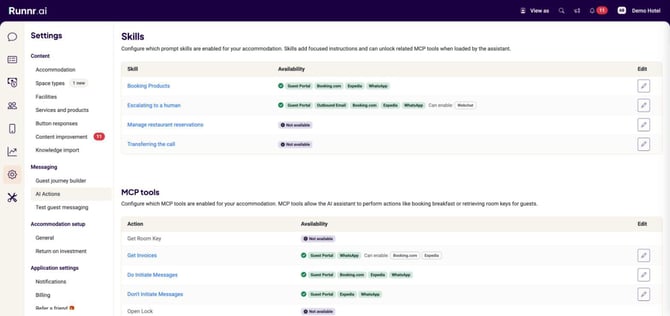
Scroll down to Department instructions. There you'll find a field for each department: Housekeeping, Technical and Front desk.
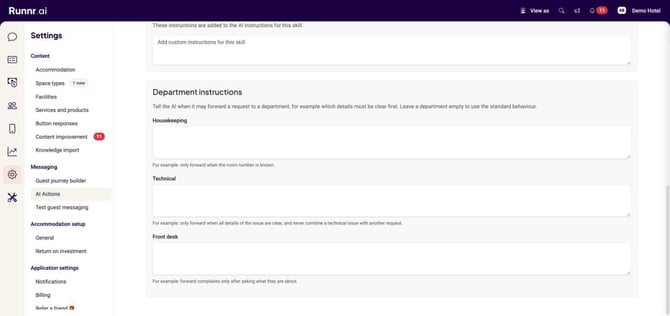
In each field, describe in plain language what the AI must know before it forwards a request to that department. If you leave a field empty, that department keeps working the way you're used to.
How it works
When a guest asks for something that needs to go to a department, the AI checks the instructions you set for that department. If information is missing, the AI asks the guest for it first. Only when everything is clear is the request forwarded.
Example: Technical
For the Technical department, you set that a malfunction must always be clearly described, including the exact location.
A guest then writes: "My curtains don't work."
Instead of forwarding this right away, the AI first asks which room it is about and what exactly is wrong. Once that is clear, the request reaches the Technical team with all the details they need.
Tips
-
Keep instructions short and specific, for example: "Always ask for the room number and a description of the problem."
-
Only ask for what your team really needs. Every extra question adds a step for the guest.
-
Start with the department that most often has to follow up with guests, and add the others later.